
Education
Redesigning the Texas Education Agency Website: Enhancing User Experience, Accessibility, and Content Organization
Project Overview
Client: Texas Education Agency (TEA)
Objective: Redesign the Texas Education Agency (TEA) website to improve user experience, streamline navigation, enhance content organization, and ensure accessibility for all users, while aligning with modern web standards.
Project Goals
- User Audience Research: Conduct in-depth research to understand the needs and behaviors of key user groups.
- User Testing: Perform usability testing to refine the website design and ensure it meets user expectations.
- Content Organization: Restructure and simplify content to improve accessibility and ease of navigation for diverse user groups.
- UX Design: Create a visually appealing and functional design that enhances usability and aligns with TEA’s mission.
- Information Architecture: Develop a clear and intuitive information architecture to improve content findability and site structure.
- Accessibility: Ensure the website meets accessibility standards to serve all users, including those with disabilities.
Challenges
- Complex Navigation: The existing website had a complicated structure that made it difficult for users to find specific educational resources and services.
- Content Overload: Content was poorly organized, causing confusion and making it challenging for users to access relevant information quickly.
- Limited Accessibility: The website did not fully meet accessibility standards, limiting access for users with disabilities.
- User Experience Gaps: The website lacked intuitive design and functionality, which hindered user engagement and satisfaction.
Solutions
- User Audience Research: Conducted detailed research through surveys and interviews with TEA staff and key user groups, including educators, parents, and administrators, to understand their needs and pain points.
- User Testing: Ran multiple rounds of user testing with different user groups to identify usability issues and ensure the website met their needs.
- Content Organization: Reorganized and streamlined the content into clear, intuitive categories based on user priorities and feedback.
- UX Design: Developed a modern, user-centered design that reflects TEA’s values, enhances accessibility, and simplifies navigation.
- Information Architecture: Created a logical information architecture that provides easy access to critical resources, including educational programs, policies, and services.
- Accessibility Improvements: Implemented accessibility best practices to ensure compliance with WCAG 2.0 standards, including text-to-speech functionality and improved color contrast.
Implementation
User Audience Research
- Conducted in-depth surveys and interviews with a variety of user groups, including teachers, parents, school administrators, and policymakers.
- Analyzed the findings to identify key pain points and areas for improvement, with a focus on enhancing user experience and accessibility.
User Testing
- Developed prototypes of the redesigned website and conducted usability testing to gather feedback from real users.
- Iterated the design based on testing results, ensuring that the final product met the needs of TEA’s audience.
Content Strategy
- Reviewed and audited existing content, identifying areas of improvement and restructuring it for clarity and ease of access.
- Simplified the language used throughout the site to ensure it was easily understandable for all user groups.
Categorized content into user-friendly sections such as Policies, Educator Resources, Parent Guides, and Programs.
UX Design and Information Architecture
- Created wireframes and prototypes that focused on enhancing user flow and simplifying navigation.
Developed an information architecture that allowed users to easily find key resources based on their role, such as educators, students, or parents. - Optimized the website design for desktop and mobile devices to provide a seamless experience across all platforms.
Accessibility Enhancements
- Ensured compliance with WCAG 2.0 guidelines by enhancing text contrast, implementing keyboard navigation, and adding alternative text for images.
- Integrated text-to-speech functionality and video captions to improve accessibility for all users.
Testing and Launch
- Conducted extensive user acceptance testing (UAT) to ensure that the website met all design, functionality, and accessibility requirements.
- Launched the redesigned website, ensuring a smooth transition for TEA staff and users.
- Provided comprehensive training for TEA staff on content management and accessibility best practices.
Results
- Improved User Experience: The redesigned website received positive feedback for its intuitive design, making it easier for users to find essential resources.
- Enhanced Accessibility: The website now fully meets WCAG 2.0 standards, providing a more inclusive experience for all users.
- Increased Engagement: Streamlined content and improved navigation resulted in higher engagement and satisfaction among the various user groups.
- Simplified Navigation: The new information architecture allowed users to quickly access critical educational resources, policies, and services based on their specific needs.

Conclusion:
The Texas Education Agency (TEA) website redesign project successfully achieved its goals of improving user experience, enhancing accessibility, and simplifying content organization. By conducting comprehensive user research, implementing best practices in UX design, and prioritizing accessibility, TEA is now able to provide a more efficient, inclusive, and user-friendly online experience. This case study underscores the importance of a user-focused approach in redesigning complex, content-rich websites, ultimately driving better user engagement and increasing access to vital educational resources.
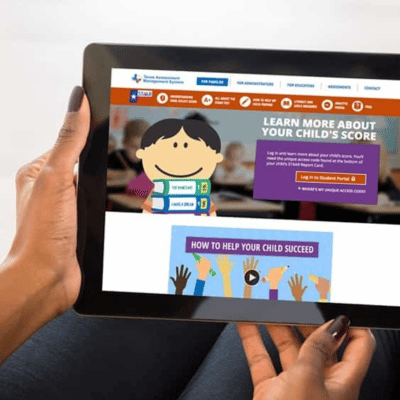
The Texas Education Agency was embarking in a huge undertaking – launching a newly designed STAAR Report Card that greatly simplified the way parents viewed their children’s standardized test results. The TEA needed to create a user-friendly site where parents login to see their child’s test results that complemented the ease and simplicity of their newly designed STAAR Report Card.